What Research looks like
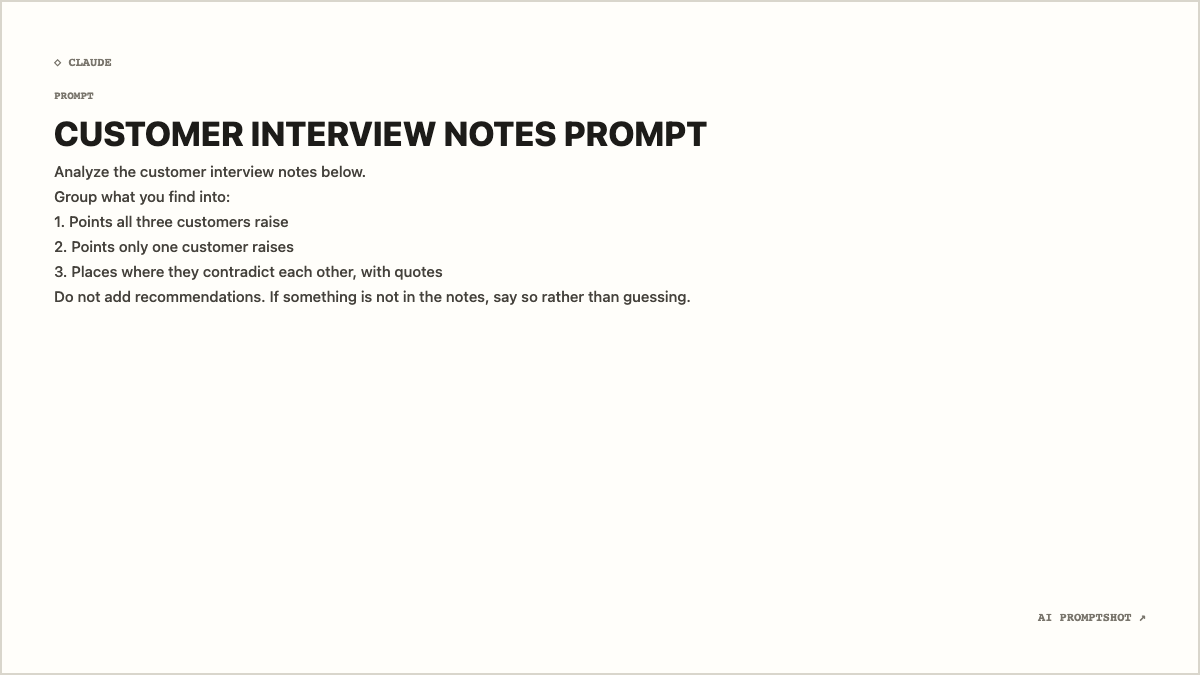
The background is near-white (#fffefa), noticeably whiter than Clean's, and the border is a light warm gray, so the card looks like a sheet of printer paper. The title is heavy black capitals; the prompt is a dark gray that keeps a long list readable without the harshness of pure black on pure white.
At 1200 × 675 a numbered list puts each item on its own row, flush left under the title. Nothing else competes for attention: no gradient, no tint, just the ◇ CLAUDE mark, the heading, the body and the small brand mark in the corner.
When to pick Research
Use Research when you're documenting how an answer was produced: the prompt behind a market summary, a literature review, or an analysis of interview notes or survey responses. In a report or a slide it looks like an exhibit, which is what it is.
It's also the strongest choice for anything printed or placed on a white page, because the card almost disappears and the text does the work. For the same restraint in a warmer tone, Clean is the close cousin; for narrative prompts, Editorial.
- research prompts
- analysis prompts
- summarization prompts
- comparison prompts
The example prompt
Analyze the customer interview notes below.
Group what you find into:
1. Points all three customers raise
2. Points only one customer raises
3. Places where they contradict each other, with quotes
Do not add recommendations. If something is not in the notes, say so rather than guessing.
An analysis prompt with an explicit output format. The numbered groups are the part a reader will want to reuse, and on this card they line up neatly under the instruction. It also says what the model must not do, a line worth keeping visible whenever you share an analysis prompt.
Tips for Research
- Spell out the format. People copy research prompts for their structure. A numbered list of the sections you want back is more useful in the image than a paragraph describing them.
- Leave the source material out. Show the instruction, not the pages of notes it ran against. Refer to what was pasted in ("the notes below") and keep the image about the method.
- Give the restrictions their own line. Lines like "do not add recommendations" are often the most valuable part of an analysis prompt, and they vanish inside a paragraph. Put each one on a separate line.