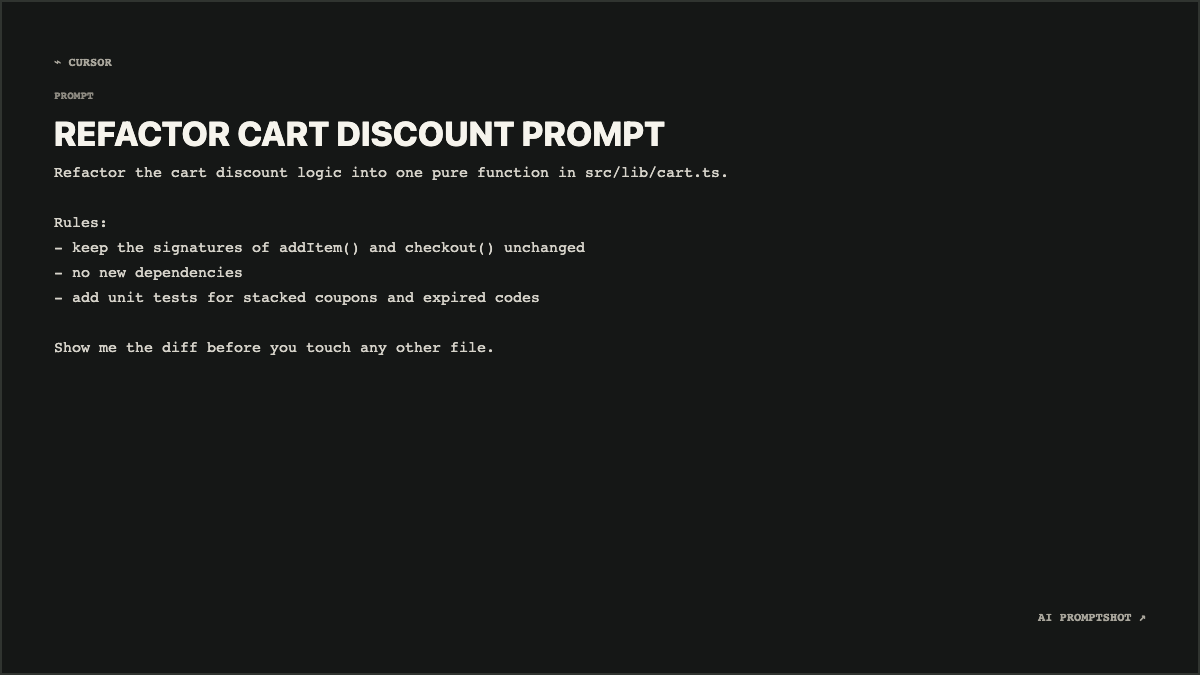
What Developer looks like
The background is almost black (#151716) with a faint gray-green border. The title stays in the bold sans-serif every template uses, but the prompt below switches to your system's monospace font, so addItem() and src/lib/cart.ts look like code and every character takes the same width.
That fixed width is why it works for technical prompts. Dashes at the start of a line form a tidy column, and blank lines you leave in the editor stay blank in the image. The ⌁ CURSOR mark sits at the top left; change it to Codex, Claude or whatever you actually used.
When to pick Developer
Choose Developer for prompts you'd hand to a coding agent, or ones you're pasting into a pull request, a README or an engineering blog post. Monospace makes identifiers unambiguous, so nobody has to squint to tell an l from a 1.
If the prompt is a list of shell steps for a talk, Terminal is wider and draws larger text. If it's technical but contains no code at all, such as an architecture question, Research is easier on the eyes.
- coding prompts
- debugging prompts
- architecture prompts
- API prompts
- technical explanations
The example prompt
Refactor the cart discount logic into one pure function in src/lib/cart.ts.

Rules:
- keep the signatures of addItem() and checkout() unchanged
- no new dependencies
- add unit tests for stacked coupons and expired codes

Show me the diff before you touch any other file.
Code-shaped text is where monospace earns its keep: the path, the function names and the dash list are all quick to scan. The gaps between the sections come straight from the empty lines in the prompt.
Tips for Developer
- Use dashes or numbers, not indentation. The renderer keeps your line breaks but collapses runs of spaces, so an indented, nested snippet comes out flat. Write structure as
-or1.lists, which survive exactly as typed. - Keep long code out of the image. This is a picture of an instruction, not a code viewer. A forty-line function forces the text to shrink until it's hard to read; link to the code and keep the prompt to what you want done.
- Open with a verb, not a path. The heading is taken from your first sentence with punctuation stripped, so a line that starts with
src/lib/cart.tsturns into a garbled title. "Refactor the cart discount logic" gave this example REFACTOR CART DISCOUNT PROMPT.